Advanced
Request condition matching
In addition to URL patterns, you can match on detailed request and response conditions.
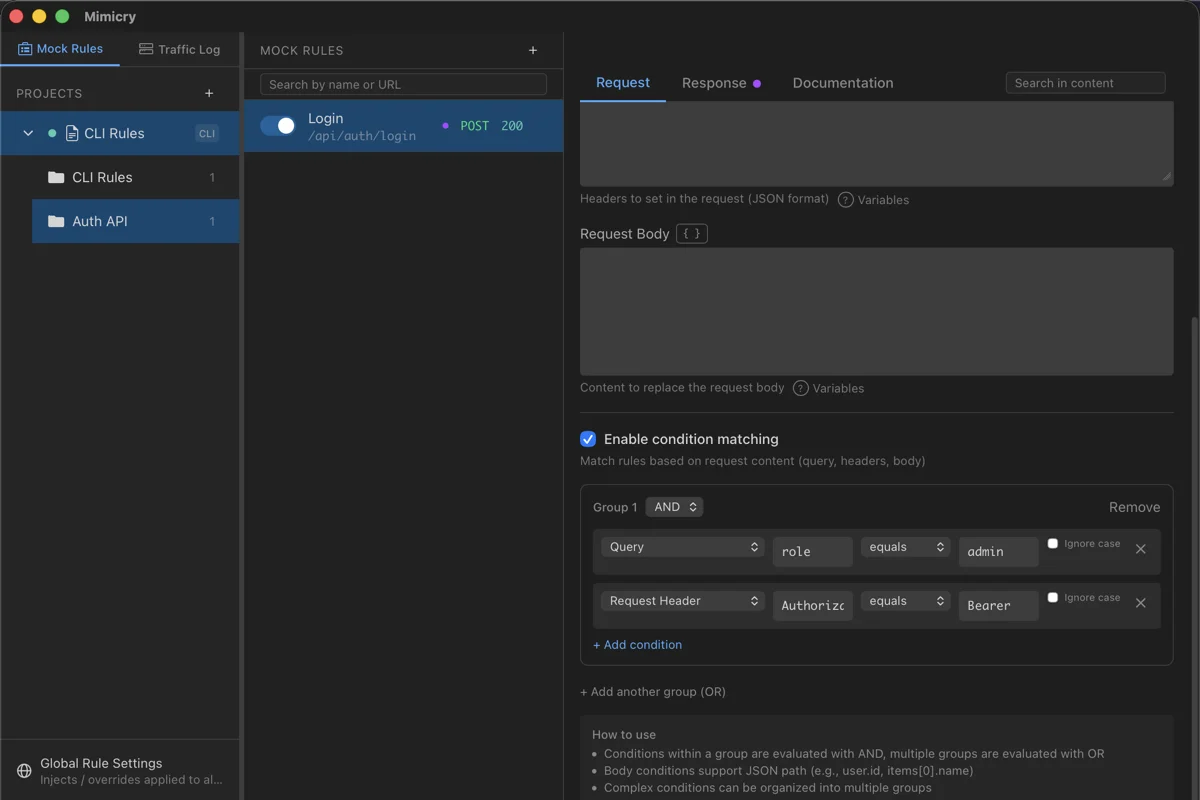
Condition types
| Type | Description | Example |
|---|---|---|
| Query parameter | Match on a URL query parameter | page=1 |
| Request header | Match on a request header | Authorization: Bearer * |
| Request body | Match on the request body content (specified by JSON path) | {"type": "premium"} |
| Response header | Match on a response header | Content-Type |
| Response body | Match on the response body content (specified by JSON path) | data.items[0].id |
| Status code | Match on the response status code | gte 400 |
| GraphQL | Match on the operation name, operation type (query / mutation / subscription), root fields, and so on | GetUser |
Operators
equalsExact match
notEqualsNegation of exact match
containsPartial match
notContainsNegation of partial match
startsWithPrefix match
endsWithSuffix match
regexRegular expression match
existsKey existence check
notExistsCheck that the key does not exist
gtNumeric greater than (>). Compares only when both sides read as numbers; otherwise it does not match
ltNumeric less than (<). Compares only when both sides read as numbers
gteNumeric greater than or equal (>=). Compares only when both sides read as numbers
lteNumeric less than or equal (<=). Compares only when both sides read as numbers
Logical operators
You can combine multiple conditions.
ANDAll conditions must be met
ORAny condition is met
Configuration example
To match only "search requests from premium users":
URL Pattern: /api/search*
Method: GET

Conditions (AND):
  - Query Parameter "q" exists
  - Header "X-User-Type" equals "premium"
Switching responses from the client side
When you want to prepare multiple response patterns for the same endpoint (success, error, empty data, and so on) and switch between them from the caller via test code or request headers, place several rules that use a dedicated header as their condition near the top of the list at a higher priority.
# Rule 1 (priority): error pattern
URL Pattern: /api/users/*
Conditions: Header "X-Mock-Response" equals "error"
Status: 500

# Rule 2 (priority): empty data pattern
URL Pattern: /api/users/*
Conditions: Header "X-Mock-Response" equals "empty"
Status: 200 / Body: []

# Rule 3 (default): no conditions
URL Pattern: /api/users/*
Status: 200 / Body: {normal response}
If the caller sends the X-Mock-Response: error header, Rule 1 matches; if it sends nothing, Rule 3 (the default) matches. Rules are evaluated from top to bottom, so place variants with more specific conditions higher up. The same mechanism works with both a local proxy and Cloud Publish.
Pass-through
Even when a mock rule matches, this feature forwards the request to the real server.
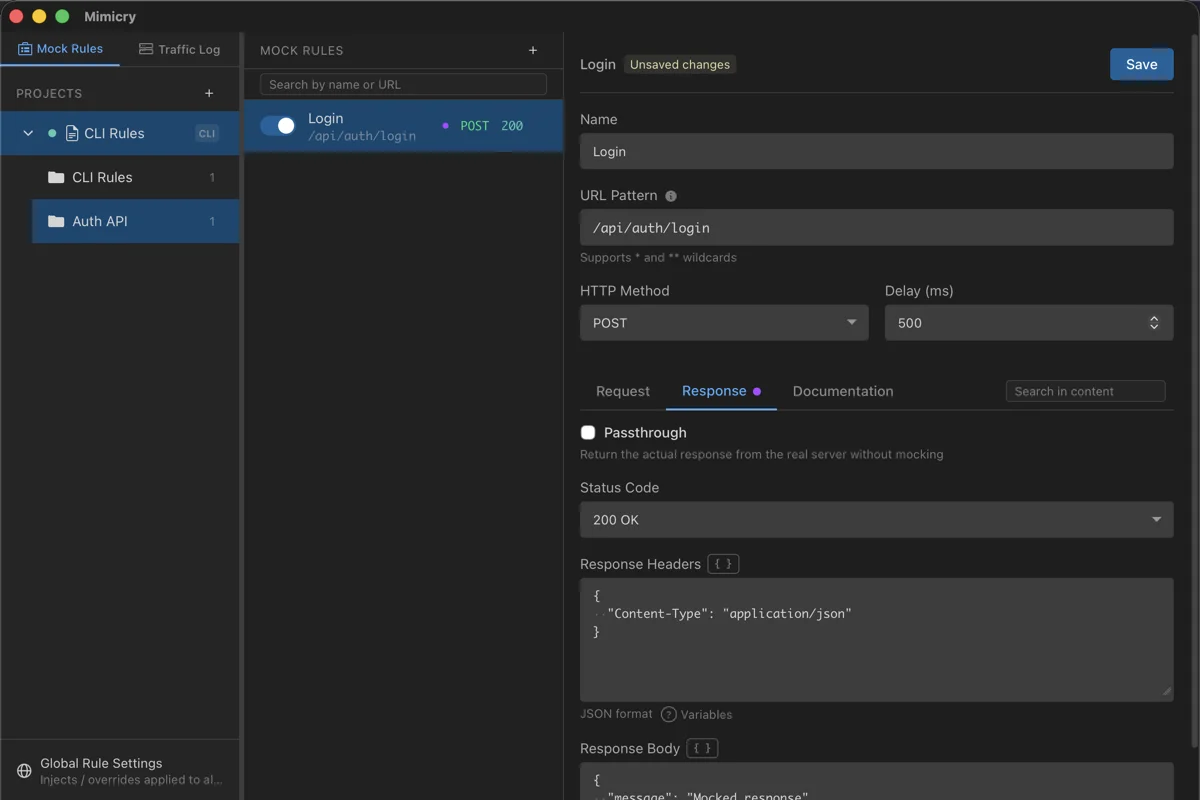
Request pass-through
Forwards the request as-is to the real server. The response returned is what you configured in the mock rule.
Use case: When you want to send the request to the server but keep the response fixed (for example, always returning a specific response in an A/B test)
Response pass-through
Returns the real server's response as-is. The mock rule is used only for condition matching.
Use case: When you want to log traffic under specific conditions but not modify the response
Tip: When you enable both request pass-through and response pass-through, the rule is used only for condition matching and logging.
Response modification
You can partially modify the response from the real server.
Status code override
With response pass-through enabled, specifying a status code lets you override the real server's status code.
# Change to 500 even if the real server returns 200
Response pass-through: ON
Status code: 500
Handy for testing error handling.
Response body merge
For JSON responses, you can merge the real server's response with the mock response.
# Real server response
{
  "id": 1,
  "name": "John",
  "status": "active"
}

# Body configured in the mock (Merge Response Body: ON)
{
  "status": "inactive",
  "debug": true
}

# Final response
{
  "id": 1,
  "name": "John",
  "status": "inactive",
  "debug": true
}
Network latency simulation
Simulate response latency to test how your app behaves under different network conditions.
Latency settings
Set the delay time in milliseconds in each rule's Delay (ms) field.
0No delay
5000.5 s
20002 s
1000010 s
Use cases
Loading state testing: Test whether the loading UI displays correctly
Timeout handling testing: Test whether timeout handling works correctly
Slow network simulation: Verify behavior on a slow network
Race condition testing: Test order-dependency problems across multiple requests
Note: The delay is applied even when response pass-through is enabled. The specified delay is added on top of the real server's response time.
OpenAPI import
Load an OpenAPI (YAML/JSON) definition file to auto-generate mock rules.
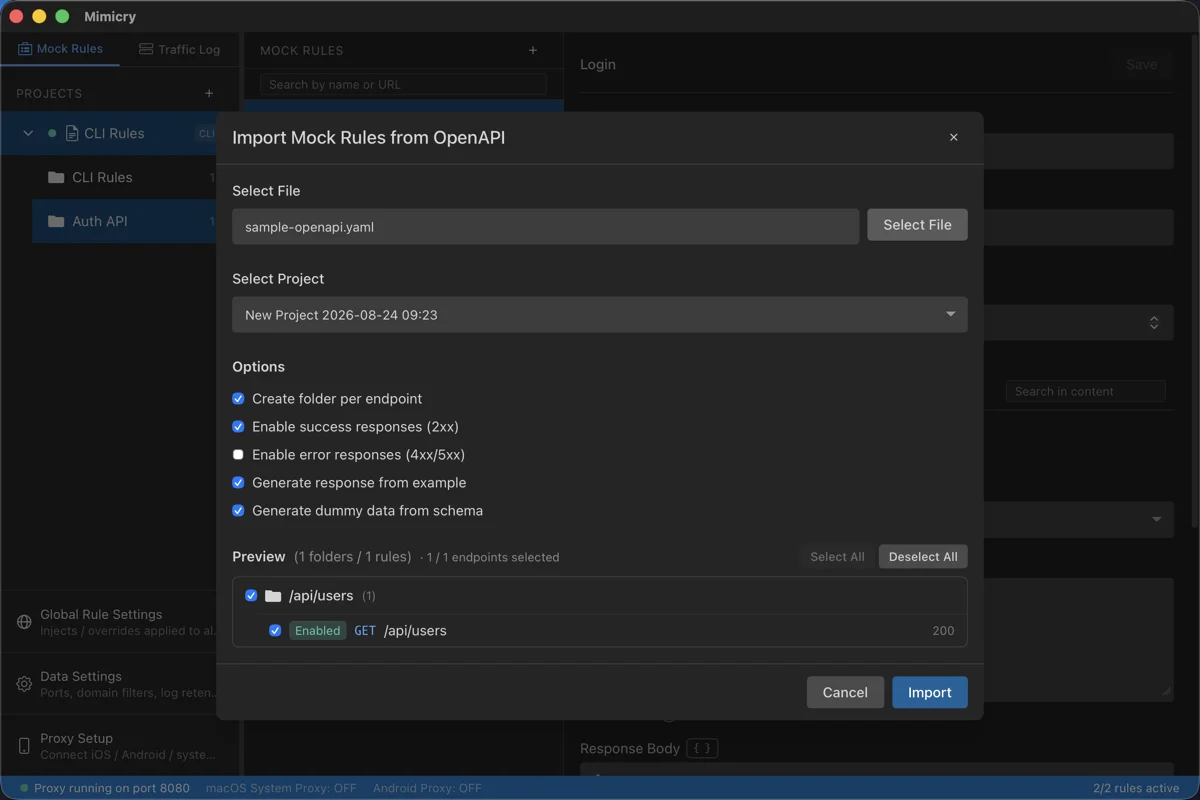
Supported formats
OpenAPI 3.xSupports the OpenAPI 3.0 / 3.1 specifications
YAML / JSONLoadable in either format
Key features
| Feature | Description |
|---|---|
| External reference resolution | $ref: './paths/users.yaml' and other external file references are resolved automatically |
| Automatic folder creation | Creates a folder per endpoint to organize the rules |
| Rule generation | Success responses (2xx) are created enabled; error responses (4xx/5xx) are created disabled |
Path conversion
OpenAPI path parameters are automatically converted to Mimicry wildcards.
# OpenAPI definition
/users/{userId}/posts/{postId}

# Converted to a Mimicry pattern
/users/*/posts/*
Response generation
Response bodies are auto-generated in the following order of priority.
exampleWhen a single example is definedexamplesUses the first of multiple examplesschemaGenerates sample data from the schemaHow to use
- 1
Click the OpenAPI Import button in the sidebar
- 2
Select an OpenAPI definition file (YAML/JSON)
- 3
Review the folder and rule structure in the preview
- 4
Click the Import button to create all mock rules at once
Tip: You can check the folder structure and rule count in the preview before importing. Even large OpenAPI definitions with external references are resolved automatically and imported correctly.
Global headers
A global setting that always adds or removes headers on the requests and responses of matching domains. It works independently of mock rules and is applied before mock rules are evaluated, so it is also injected into requests that return a mock response.
Manage it in the dedicated modal opened from Global Settings (the globe icon) at the bottom of the sidebar.
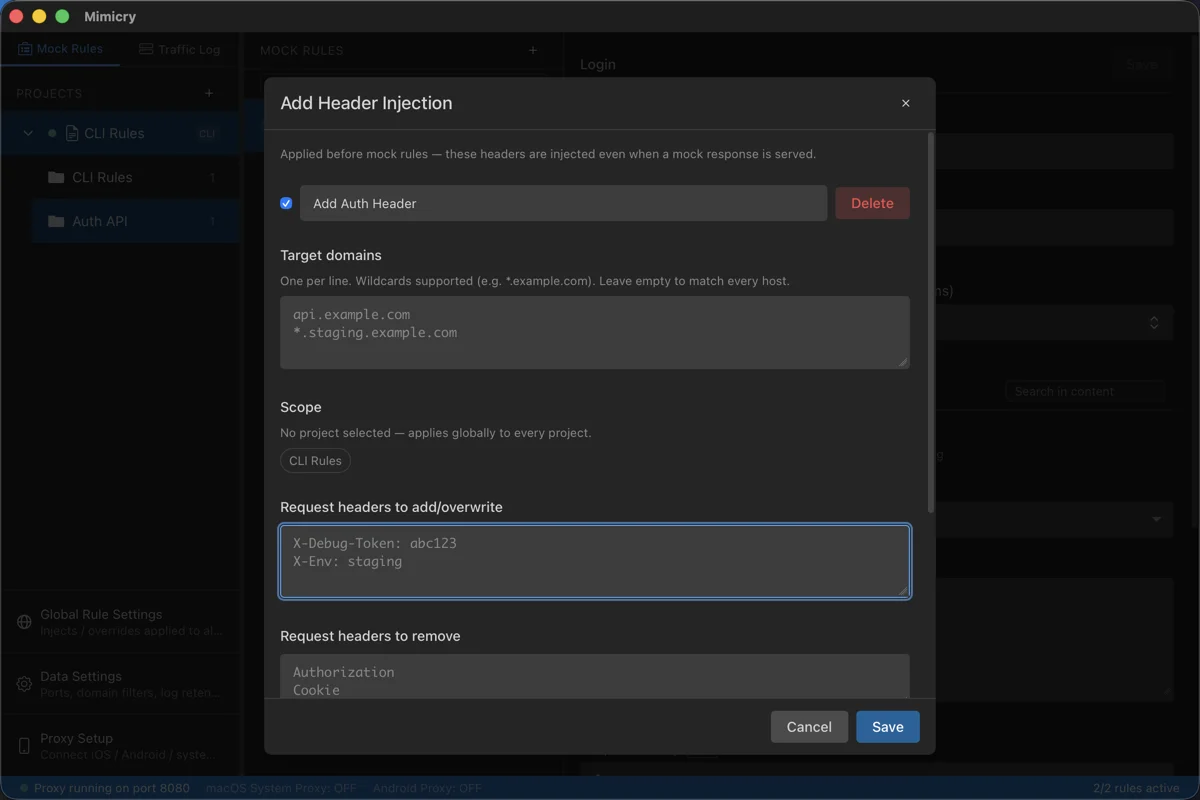
Settings
| Item | Description |
|---|---|
| Target domains | One entry per line. Wildcards ( *.example.com) are supported. If left empty, applies to all domains |
| Scope | When unselected, applies to all projects (global). When a project is selected, applies only while that project is active |
| Add / override on the request | Adds arbitrary headers to the request forwarded upstream |
| Remove from the request | Removes the specified headers before forwarding upstream |
| Add / override on the response | Adds arbitrary headers to the response returned to the client |
| Remove from the response | Removes the specified headers before returning to the client |
Use cases
Injecting a staging auth token:
Authorization: Bearer xxxis always injected, saving you from setting it manually every timeInjecting a debug header:
X-Debug-Tokenand similar headers are always added to correlate with server-side logs
Configuration example
To add an auth token to every API in the staging environment:
Name: Staging auth token
Target domains:
  *.staging.example.com
Scope: (unselected → all projects)
Headers to add / override on the request:
  Authorization: Bearer eyJhbGciOi...
  X-Debug-Token: dev-local
Tip: Global headers are processed before mock rules are evaluated. Because they are also injected into requests that return a mock response, note that when combining them with header-based matching conditions, matching is judged on the post-injection values.
Template syntax and environment variables
You can embed {{ ... }} -style placeholders in a mock rule's response body, response headers, request-rewrite body, and request-rewrite headers. They are evaluated just before the matched request is returned and replaced with dynamic values.
Available placeholders
| Syntax | Expanded value |
|---|---|
{{now}} | Returns the current time in RFC3339 format |
{{now+3d}} / {{now-1h}} | Returns an offset from the current time in RFC3339. Units are d / h / m / s |
{{uuid}} | Generates a single UUID v4 |
{{random_int(min,max)}} | A random integer from min to max inclusive |
{{random_choice(a,b,c)}} | Randomly selects one of the comma-separated candidates |
{{random_date(YYYY-MM-DD,YYYY-MM-DD)}} | A random date within the specified range |
{{env.NAME}} | Replaced with the value of the global environment variable NAME |
Example in a response body
An example of returning a unique ID and timestamp every time:
{
  "id": "{{uuid}}",
  "createdAt": "{{now}}",
  "expiresAt": "{{now+7d}}",
  "score": {{random_int(1,100)}},
  "status": "{{random_choice(active,pending,closed)}}"
}
Global environment variables
A single key=value setting shared across all projects. You can reference it from a mock rule with the {{env.NAME}} syntax. Extract values that differ per environment (host names, tokens, tenant IDs, and so on) out of the mock rule body so you can switch them without rewriting the rule.
In the modal opened from Global Settings (the globe icon) at the bottom of the sidebar, edit the keys and values in the Environment Variables section.
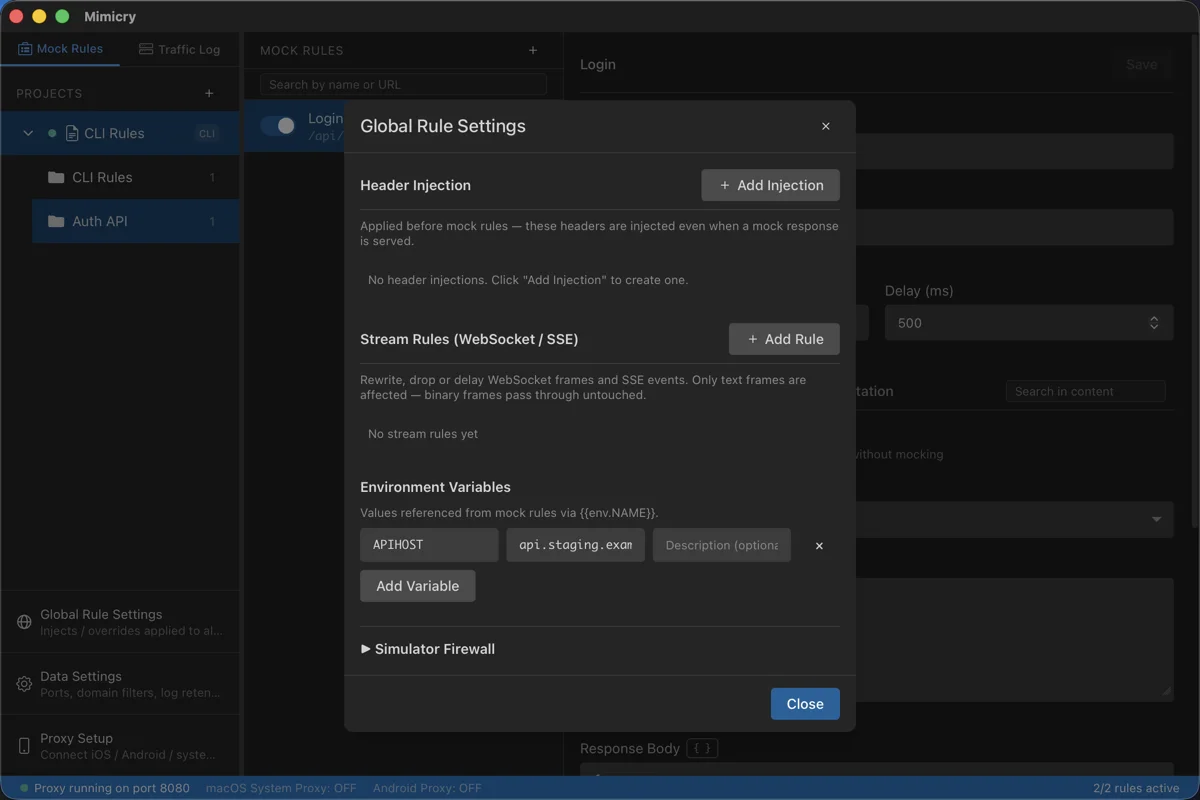
Configuration example
An example of defining the API host and region as environment variables:
# Global Settings → Environment Variables
API_HOST   = api.staging.example.com
REGION     = ap-northeast-1
TENANT_ID  = tenant-acme-001
Reference them from a mock rule's response body:
{
  "endpoint": "https://{{env.API_HOST}}/v1/users",
  "region": "{{env.REGION}}",
  "tenant": "{{env.TENANT_ID}}"
}
You can also reference them from request-rewrite headers:
{
  "X-Tenant-Id": "{{env.TENANT_ID}}",
  "X-Region": "{{env.REGION}}"
}
Use cases
Switching the API host: Embed
{{env.API_HOST}}as the URL in the response and swap only the value between staging and productionSwapping region and tenant: For multi-region or multi-tenant apps, switch via environment variables instead of embedding values in the rule itself
Separating secrets when sharing: Keep values such as auth tokens in environment variables and share only the mock rules with your team
Behavior on export / import
Environment variables are part of the global rule scope and are included in export / import.
- Existing keys take precedence: When a variable with the same name is already set at import time, the existing value is kept and not overwritten
- New keys are added: A key that exists only in the import source is added by name only. An export carries just the names and descriptions of environment variables, never their values, so you set the value of an added variable yourself
Tip: If you set machine-specific values (such as your personal access token) as environment variables locally, your settings are not overwritten even when you import mock rules shared by your team.
Scripts
A feature that dynamically transforms requests and responses with JavaScript. You can programmatically handle dynamic rewrites that mock rules can't express (adding a signature, rotating tokens, overwriting part of the body, and so on).
Open the dedicated window from Tools → Script... in the menu to create, edit, and enable scripts.
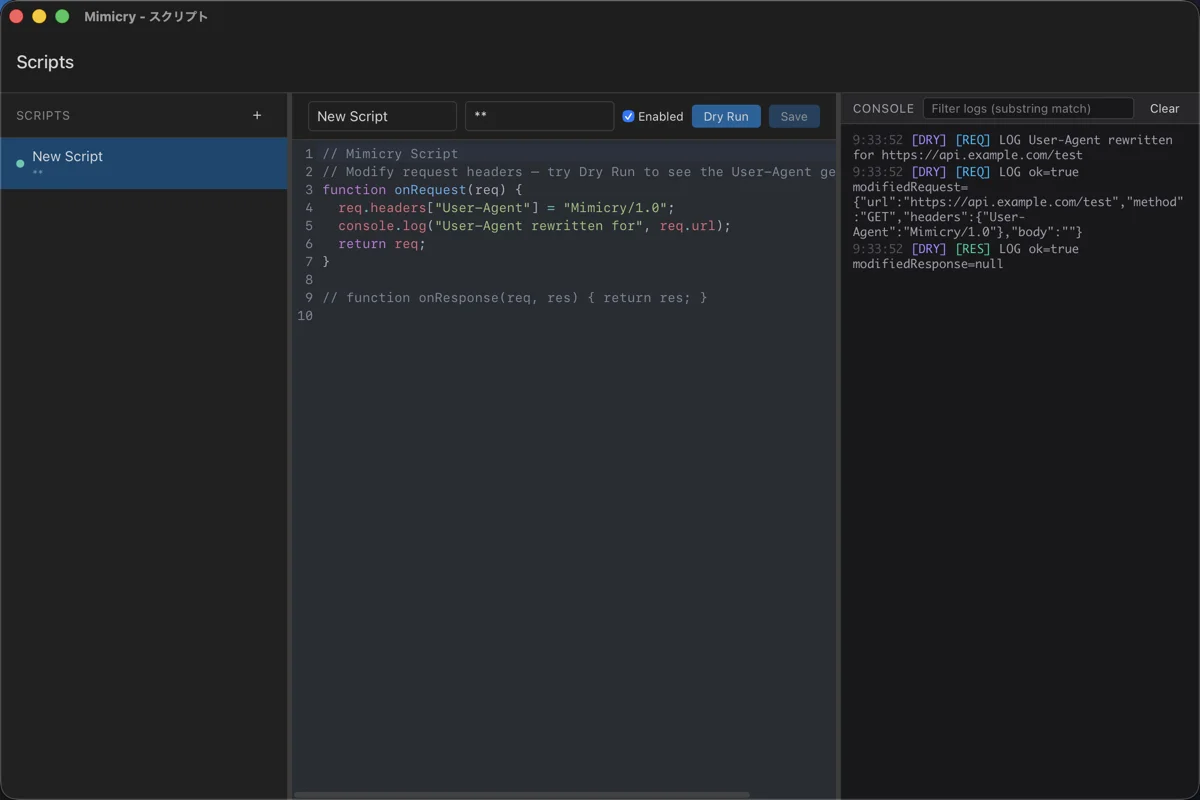
Hooks
Define the following functions in your script and they are called at the corresponding times.
| Hook | Timing | Return value |
|---|---|---|
onRequest(request) | Just before the request is sent upstream | Return a modified request to replace its contents |
onResponse(request, response) | Just before the response is returned to the client | Return a modified response to replace its contents |
Request/response objects
The objects passed to the hooks have the following structure.
// request
{
  url: string,        // e.g. "https://api.example.com/items?id=1"
  method: string,     // "GET" / "POST" / ...
  headers: { [name: string]: string },
  body: string,       // text (url is read-only)
}

// response
{
  statusCode: number, // e.g. 200
  headers: { [name: string]: string },
  body: string,       // decompressed text
}
Scope and activation
- Scope (URL pattern): Narrows down the target traffic by host and path, matched the same way as a mock rule's URL pattern (e.g.,
api.example.com/**). The default is**(every request). - Enabled/disabled: Toggle per script. A disabled script is not run even if it matches.
- console output:
console.log/warn/errorare shown in real time in the console at the bottom of the script window. - Dry run: Test-run the script with a dummy request/response. You can check hook behavior and logs without sending real traffic.
Script example
An example that adds a signature to the request header and rewrites part of the response body:
// Scope: api.example.com/**

function onRequest(request) {
  // Add a signature to the request
  request.headers['X-Signature'] = 'sig-' + Date.now();
  console.log('signed:', request.url);
  return request;
}

function onResponse(request, response) {
  // Overwrite part of the JSON response
  if ((response.headers['content-type'] || '').includes('application/json')) {
    try {
      const json = JSON.parse(response.body);
      json.debug = { injectedBy: 'mimicry-script' };
      response.body = JSON.stringify(json);
    } catch (e) {
      console.warn('JSON parse failed:', e.message);
    }
  }
  return response;
}
Runtime environment
Scripts run in a sandbox and cannot directly access external resources (network or file system). Each hook run is capped at 1 second and 16 MB of memory, and each request is evaluated in an isolated context, so no state is shared between scripts or across calls.
Note: Binary bodies (images, videos, and so on) and bodies over 4 MiB are never handed to a hook: the script does not run for that traffic, and the traffic goes through unchanged. Scripts also run one at a time, so when traffic piles up and the wait for the runtime exceeds 2 seconds, the script is skipped and the traffic passes through untouched. The skip is recorded in the script trace of the traffic log entry and in the scripts console.
Simulator/Emulator firewall
iOS Simulator and Android Emulator aren't sandboxed containers — they run as processes directly on the macOS host. When you let an AI agent such as Claude Code operate an app, there's a risk that unexpected traffic could exfiltrate sensitive files like ~/.ssh. This feature is a global safeguard that keeps traffic from apps running inside a Simulator/Emulator from reaching anywhere outside the domains you've allowed.
Configure it in the collapsible Simulator/Emulator Firewall section (collapsed by default) inside the Global Settings modal (the globe icon) at the bottom of the sidebar. This is a global setting rather than a per-project one, and there's no mechanism to register or identify individual apps — it judges traffic per Simulator/Emulator instance instead.
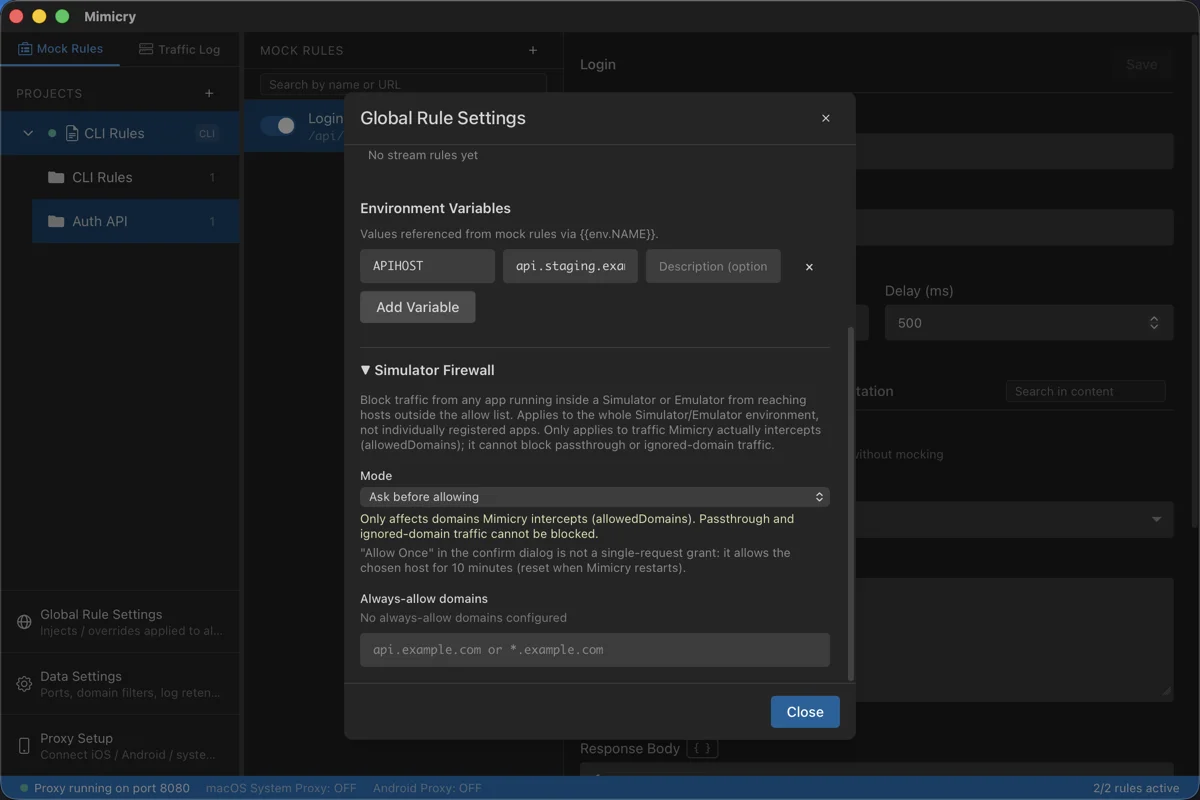
Modes
| Mode | Description |
|---|---|
| Off | Disables the firewall (default). |
| Ask before allowing | Shows a confirmation dialog the first time traffic reaches an unknown host outside the always-allowed domains, with a choice of "Allow once / Always allow / Deny." "Allow once" is not a single-request grant: it allows the chosen host for 10 minutes (reset when Mimicry restarts). If there's no response for 30 seconds, it's automatically denied. When multiple confirmations are pending, they're shown together in a single dialog so you can respond to each one individually, and multiple requests to the same host are consolidated into one entry. |
| Deny automatically | Blocks access outside the always-allowed domains immediately with no dialog (403). |
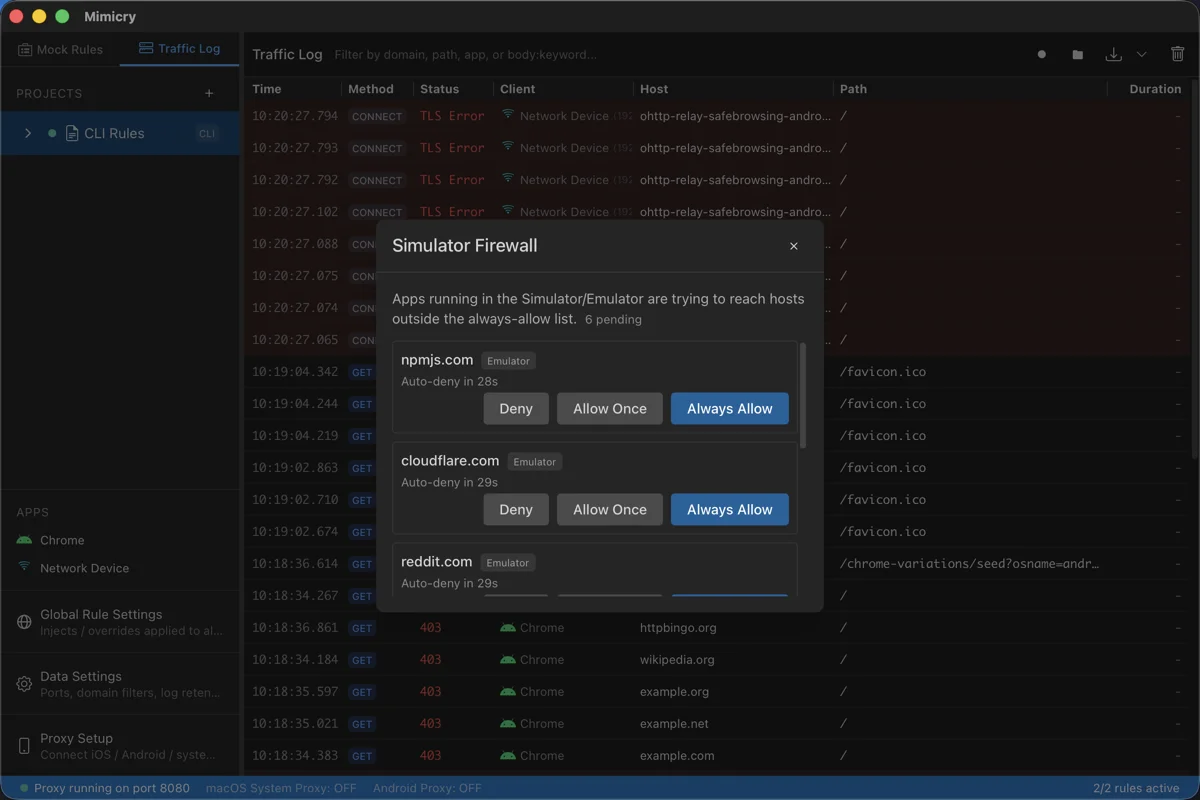
Always-allowed domains
A manually editable list of domains. Wildcards (api.example.com or *.example.com) are supported, and domains you choose "Always allow" for in the confirmation dialog are also added to this list.
Checking from the CLI
You can check the current settings with mimicry firewall status, but there's intentionally no command to change the settings from the CLI. This is so an AI agent can't disable this safeguard itself through the CLI — changing the mode or adding domains is only possible from the GUI.
$ mimicry firewall statusNote: The firewall only affects traffic that Mimicry actually intercepts (allowed domains). It can't block traffic configured for pass-through or as an ignored domain. If you want to reliably control Simulator/Emulator traffic, make sure the target domains are included in the intercepted domains.
Stream rules (WebSocket / SSE)
Mock rules do not cover WebSocket. To change WebSocket frames and SSE events, use a stream rule. Add one from "Stream Rules (WebSocket / SSE)" in the Global Settings modal (the globe icon).
Actions
- Replace body: Replaces the whole body of the message. Template syntax is available.
- Merge JSON: Merges the JSON object you specify into a JSON message.
- Drop: Does not forward the matching message.
- Delay: Holds the matching message for the given number of milliseconds before forwarding it.
Note: Only text frames and events are targeted; binary frames pass through. The URL pattern narrows down the connection, and the direction of each action (both / client to server / server to client) narrows down the message. On SSE, one block separated by blank lines is one message, and body rewrites apply to the content of data:.
Controlling what an AI agent can do
The Global Settings modal has two items that control what an AI agent can do through the CLI and the MCP server.
MCP tool permissions
You can switch off any of the 29 tools that mimicry mcp-server exposes, one by one. Everything is allowed by default, and a tool switched off is not executed when called; it returns a toolDisabled error instead. You can also switch the write group and the read group as a whole. Changes take effect from the next tool call, and the MCP server does not need a restart.
Sensitive headers in CLI / MCP output
In the traffic logs returned by the mimicry CLI, the REST API, and the MCP server (and in the HAR that mimicry save writes), the values of sensitive headers such as Authorization / Cookie / Set-Cookie are replaced with [REDACTED] by default. The GUI display and recording files are not affected, and values in URL queries and bodies are not masked. Turn on "Show sensitive headers in CLI / MCP output" to stop the masking.
Note: While sensitive headers are shown, tokens and cookies can end up in an AI agent's context. Switch it back off when you no longer need it.